On this page
Pros Don't Vibe, They Control: What Developers Reveal About AI Agent Use
A UC San Diego study of 112 professional developers found the opposite of what Twitter preaches: experienced developers don't vibe code. They plan, prompt with surgical precision, and verify every line.
The loudest voices on Twitter will tell you vibe coding is the future. Just describe what you want, let the agent rip, and ship it. Don’t read the diffs. Forget the code exists. Trust the vibes.
A research team at UC San Diego studied 112 professional developers (3-25 years of experience) and found the exact opposite. Their most salient finding: professional software developers do not vibe code. They carefully control the agents through planning and supervision.
This isn’t a survey of hobbyists building weekend projects. The study combined 13 field observations (45-minute recorded sessions of developers doing real work) with a qualitative survey of 99 experienced developers. The participants used Claude Code, Cursor, GitHub Copilot, and Windsurf on production software, side projects, and R&D work. The median experience was 10 years.
Here’s what the data actually shows about how pros use AI agents.
The Control Gap: What Pros Do Differently
Every single observed developer, all 13 of them, controlled the software design and implementation when working with agents. Not most. All.
11 out of 13 created new features during the study. Every one of them controlled the design of those features, either creating the plan entirely themselves or reviewing agent-generated plans against their engineering expertise. Even when working on unfamiliar tasks, they didn’t hand over the reins.
The strategies broke down into three levels of implementation control:
| Control Level | Behavior | Participants |
|---|---|---|
| Monitored execution | Specified requirements, let agent implement, closely watched outputs | P1, P4, P5 |
| Reviewed every change | Let agents generate code, carefully reviewed all diffs | P2, P3, P6, P7, P8, P9, P10, P11, P13 |
| Used agent as reference only | Coded manually, used agent for explanation and architecture diagrams | P12 |
Even the “monitored execution” group wasn’t vibing. They rejected unnecessary dependencies the agent tried to install. They manually traced through misbehaving code with debuggers. They were skeptical and controlling despite not reading every line.
Why this matters: The study explicitly addressed why pros refuse to vibe. Four reasons emerged:
- Software engineering principles are hard-won habits, not optional decorations
- Production code affects real users and involves stakeholders who define requirements
- For familiar codebases, developers have better context than agents
- When agent solutions go wrong on unfamiliar tasks, fixing them is frustrating and slow
As one survey respondent (S64) put it: “AI agents become problematic once you’re not making them adhere to engineering principles that have been established for decades.”
The Anatomy of a Pro Prompt
One of the most interesting parts of the study is how the researchers dissected the actual prompts developers used. They identified 10 types of context that pros embed in their prompts:
| Context Type | How Many Participants Used It |
|---|---|
| Technical terms | 12/13 |
| Reference to input files | 10/13 |
| Specific library or API | 10/13 |
| Domain objects | 8/13 |
| UI or design terms | 7/13 |
| Interaction descriptions | 7/13 |
| New feature or requirements | 7/13 |
| Reference to output file | 6/13 |
| Purpose of feature | 7/13 |
| Reference to step in plan | 5/13 |
Here’s an actual prompt from the study that demonstrates what “clear context and explicit instructions” looks like in practice:
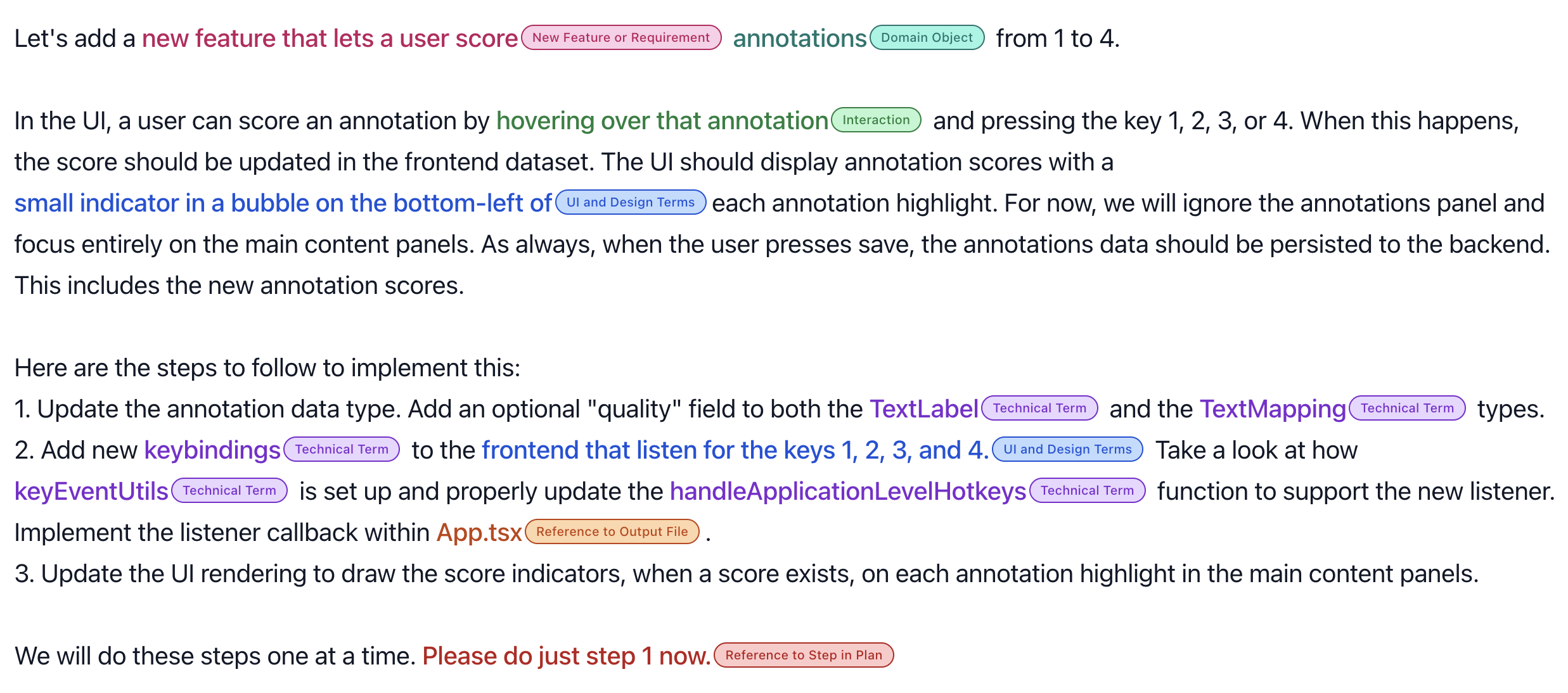
This prompt from participant P3 packs seven of those 10 context types into a single request: data types, domain objects, specific UI interactions, output files, and the critical constraint at the end: “Please do just step 1 now.”
That last line is the key. Participants with plans of 70+ steps still only let the agent execute 2.1 steps on average per prompt. They chunked the work, verified after each chunk, then continued.
Why this works: Prompting agents is not about writing English prose. It’s about translating software engineering specifications into agent instructions. As one respondent said, they approach it by “applying the lessons of software engineering to narrative.”
What Agents Are Actually Good At (and Bad At)
The survey asked developers to reflect on task suitability. The results create a clear picture of where agents deliver and where they fall apart. Out of 59 fine-grained task types mentioned in at least 5 surveys:
Suitable (strong consensus):
| Task | Suitable | Unsuitable |
|---|---|---|
| Accelerating productivity | 35 | 2 |
| Small/straightforward tasks | 33 | 1 |
| Following well-defined plans | 28 | 2 |
| Generating new code | 27 | 2 |
| Tedious/repetitive tasks | 26 | 0 |
| Scaffolding or boilerplate | 25 | 0 |
| Writing tests | 19 | 2 |
| Writing/updating documentation | 20 | 0 |
| General refactoring | 18 | 3 |
| Prototyping or small projects | 12 | 0 |
Unsuitable (strong consensus):
| Task | Suitable | Unsuitable |
|---|---|---|
| One-shotting code without verification | 5 | 23 |
| Integrating with existing/legacy code | 3 | 17 |
| Complex tasks | 3 | 16 |
| Business logic/domain knowledge | 2 | 15 |
| Replacing human expertise | 0 | 12 |
| Writing performant code | 3 | 9 |
| High-stakes or privacy-sensitive | 0 | 8 |
| Big tasks | 1 | 7 |
| Vague/open-ended tasks | 0 | 7 |
The controversial middle ground: High-level planning (13 suitable vs. 23 unsuitable) and general debugging (12 vs. 8) split opinions. Some developers used agents as brainstorming partners for architecture. Others wouldn’t touch it: “I never trust LLMs for systematic issues” (S68).
The pattern is clear: as task complexity increases, agent suitability drops. Agents are accelerators for well-scoped work, not autonomous engineers.
The Quality Attributes That Don’t Budge
When the researchers asked what developers cared about most when using agents, 67 out of 99 survey respondents mentioned software quality attributes, outnumbering the 37 who mentioned productivity.
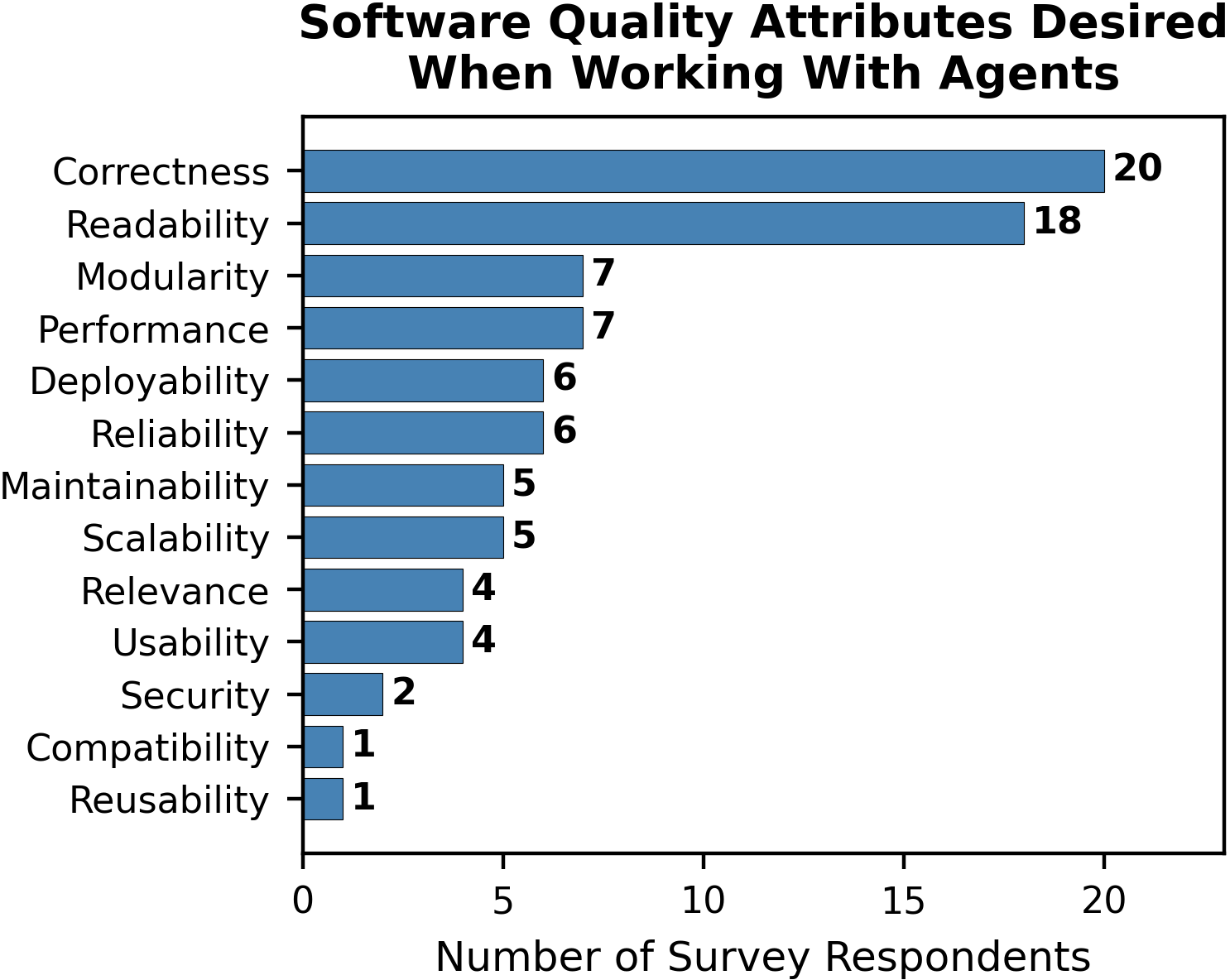
Correctness and readability dominated. Developers didn’t relax their standards just because an agent wrote the code. If anything, they raised them. Five observation participants felt more willing to test code systematically while using agents. One participant (P6) reinforced test-driven development by having agents generate test cases for every change, citing higher test coverage than before because “it’s part of the workflow now.”
The quality bar doesn’t lower for agent-generated code. It gets applied harder.
The Sentiment Paradox: Happy but Skeptical
Here’s where it gets interesting. Despite all the control and skepticism, developers overwhelmingly enjoy working with agents:
| Metric | Average Rating |
|---|---|
| Enjoyment (1-6 scale) | 5.11/6 |
| Task suitability (1-6 scale) | 4.73/6 |
| Code modification frequency (1-5 scale) | 3.0/5 (about half the time) |
77 out of 99 respondents rated their enjoyment in the top two categories. Developers found coding fun again: “This has made code fun again. I’m producing things that I didn’t have time or energy to do before. It’s like rediscovering computers again for the first time” (S8).
But the enjoyment comes from collaboration, not delegation. “I like coding alongside agents. Not vibe coding. But working with” (S96). The F1 car metaphor from another respondent captures it perfectly: “It felt like driving a F1 car. While it also felt like getting stuck in traffic jam a lot, I still felt optimistic about it” (S24).
The key insight: Happiness correlates with control, not with letting go. The developers who enjoyed agents most were the ones who stayed in the driver’s seat.
What This Means for Your Workflow
The study isn’t just academic. It maps directly onto practical strategies:
Prompt with specificity, not vibes. Include file names, function names, library references, domain objects, and expected behavior. Treat every prompt like a mini-specification. The most effective prompts in the study contained 7+ types of context.
Chunk your plans. Even developers with 70-step plans only let agents execute 2-3 steps at a time. Verify after each chunk. As one participant put it: “Please do just step 1 now.”
Use agents for the right tasks. Boilerplate, scaffolding, tests, docs, simple refactoring, and code generation from clear specs. Pull back for complex logic, business rules, architecture decisions, and legacy code integration.
Test harder, not softer. Several participants reported that working with agents actually increased their testing discipline. Agent-generated code needs verification. Build that into the workflow rather than fighting it.
Stay the pilot. “I do everything with assistance but never let the agent be completely autonomous. I am always reading the output and steering” (S83). Zero respondents said agents could replace human decision-making.
The Bottom Line
The vibe coding narrative is seductive. It suggests we’re one model upgrade away from describing apps in English and shipping them. The data tells a different story.
112 experienced developers, median 10 years of experience, using the best tools available in 2025, found that agents are powerful accelerators for well-defined, straightforward tasks. But the moment you stop controlling the agent, the moment you “give in to the vibes,” quality drops and frustration climbs.
The future of AI-assisted development isn’t vibing. It’s engineering with better tools. The developers who get the most out of agents are the ones who bring the most engineering discipline to the table.
As S28 summarized in the study’s own conclusion: “No matter how you slice it, agents are extremely accelerating. One word of warning to the young ones getting into the business: it’s still really important to know what you’re doing.”
Working with AI agents in your development workflow? I’d love to hear what control strategies work for you. Reach out on LinkedIn.